Andrew Zaletski College Articulation Blog
Blog post to describe the processes within platformer3x
- Game Construction
- Class Design Using DrawIO Tool
- My Favorite Change
- Working in a Team for Game Development
Game Construction
JavaScript Objects Setup for Leaderboard.js
- We reconstructed the leaderboard to be designed as one extended object that would allow for development to be more streamlined in the future
const Leaderboard = {
    currentKey: "localTimes",
    currentPage: 1,
    rowsPerPage: 10,
    isOpen: false,
    detailed: false,
    dim: false,
    currentSort: "time-l",
}
Single Responsibility Principle
- The idea that every object utilized in OOP should only be used for one specific function
collisionAction() {
        // check player collision
        if (this.collisionData.touchPoints.other.id === "player") {
            if (this.id) {
                GameEnv.claimedCoinIds.push(this.id)
            }
            this.destroy();
            GameControl.gainCoin(5)
            GameEnv.playSound("coin");
        }
    }
- The coin is then returned to an array after the collision is confirmed
this.id = this.initiateId()

initiateId() {
        const currentCoins = GameEnv.gameObjects

        return currentCoins.length //assign id to the coin's position in the gameObject Array (is unique to the coin)
    }
Game Control Code
- The
gameSetupfile begins by importing all relevant gameObjects from the other files within the repository
import Background from './Background.js'
import BackgroundHills from './BackgroundHills.js';
import BackgroundCoral from './BackgroundCoral.js';
import BackgroundMountains from './BackgroundMountains.js';
import BackgroundTransitions from './BackgroundTransitions.js';
import BackgroundClouds from './BackgroundClouds.js';
import BackgroundWinter from './BackgroundWinter.js';
import BackgroundSnow from './BackgroundSnow.js';
import BackgroundFish from './BackgroundFish.js';
import Platform from './Platform.js';
import JumpPlatform from './JumpPlatform.js';
import Player from './Player.js';
import PlayerHills from './PlayerHills.js';
import PlayerSkibidi from './PlayerSkibidi.js';
import PlayerWinter from './PlayerWinter.js';
import PlayerMini from './PlayerMini.js';
import PlayerQuidditch from './PlayerQuidditch.js';
import PlayerBase from './PlayerBase.js';
import Tube from './Tube.js';
import Tube1 from './Tube1.js';
import Tree from './Tree.js';
import Cabin from './Cabin.js';
import Goomba from './Goomba.js';
import FlyingGoomba from './FlyingGoomba.js';
import GlowBlock from './GlowBlock.js';
import Mushroom from './Mushroom.js';
import Coin from './Coin.js';
import Snowflake from './Snowflake.js';
import FlyingUFO from './FlyingUFO.js';
import Alien from './Alien.js';
import GameControl from './GameControl.js';
import Enemy from './Enemy.js';
import Owl from './Owl.js';
import Snowman from './Snowman.js';
import Cerberus from './Cerberus.js';
import PlayerGreece from './PlayerGreece.js';
import Flag from './Flag.js';
import Dragon from './Dragon.js';
import Star from './Star.js';
import Dementor from './Dementor.js';
import Draco from './Draco.js';
import skibidiTitan from './SkibidiTitan.js';
import Laser from './Laser.js';
import SkibidiToilet from './SkibidiToilet.js';
- For our level specifically, the referenced objects are
playerSkibidi,skibidiTitan,LaserandskibidiToilet - Then the objects are all initilized at the start of the game when
startGameCallBackis called via an event listener
startGameCallback: async function() {
        const id = document.getElementById("gameBegin");
        // Unhide the gameBegin button
        id.hidden = false;

        // Wait for the startGame button to be clicked
        await this.waitForButtonStart('startGame');
        // Hide the gameBegin button after it is clicked
        id.hidden = true;

        return true;
    },
- Following this, all appropriate assets are defined and given parameters
- For our level, these assets include
vbucksunder obstacles,skibidiSandunder platforms,escaperunder players, andskibidiToiletandskibidiTitanunder enemies - After this, the level is defined under
skibidiGameObjectsand set to be a new gameLevel
const skibidiGameObjects = [
          // GameObject(s), the order is important to z-index...
          { name: 'desert', id: 'background', class: Background, data: this.assets.backgrounds.desert },
          //{ name: 'clouds', id: 'background', class: BackgroundClouds, data: this.assets.backgrounds.clouds },
          { name: 'skibidiTitan', id: 'skibidiTitan', class: skibidiTitan, data: this.assets.enemies.skibidiTitan, xPercentage:  0.35, minPosition: 0.5 },
          { name: 'sand', id: 'platform', class: Platform, data: this.assets.platforms.sand },
          { name: 'blocks', id: 'jumpPlatform', class: BlockPlatform, data: this.assets.platforms.skibidiSand, xPercentage: 0.2, yPercentage: 1 },
          { name: 'blocks', id: 'jumpPlatform', class: BlockPlatform, data: this.assets.platforms.skibidiSand, xPercentage: 0.4, yPercentage: 0.6 },
          { name: 'blocks', id: 'jumpPlatform', class: BlockPlatform, data: this.assets.platforms.skibidiSand, xPercentage: 0.325, yPercentage: 0.8 },
          { name: 'blocks', id: 'jumpPlatform', class: BlockPlatform, data: this.assets.platforms.skibidiSand, xPercentage: 0.2, yPercentage: 0.5 },
          { name: 'blocks', id: 'jumpPlatform', class: BlockPlatform, data: this.assets.platforms.skibidiSand, xPercentage: 0.225, yPercentage: 0.5 },
          { name: 'blocks', id: 'jumpPlatform', class: BlockPlatform, data: this.assets.platforms.skibidiSand, xPercentage: 0.0, yPercentage: 0.5 } ,
          { name: 'blocks', id: 'jumpPlatform', class: BlockPlatform, data: this.assets.platforms.skibidiSand, xPercentage: 0.025, yPercentage: 0.5 },
          { name: 'blocks', id: 'jumpPlatform', class: BlockPlatform, data: this.assets.platforms.skibidiSand, xPercentage: 0.025, yPercentage: 0.5 },
          { name: 'coin', id: 'coin', class: Coin, data: this.assets.obstacles.vbucks, xPercentage: 0.325, yPercentage: 0.7 },
          { name: 'coin', id: 'coin', class: Coin, data: this.assets.obstacles.vbucks, xPercentage: -0.0125, yPercentage: 0.4 },
          { name: 'coin', id: 'coin', class: Coin, data: this.assets.obstacles.vbucks, xPercentage: 0.0125, yPercentage: 0.4 },
          { name: 'coin', id: 'coin', class: Coin, data: this.assets.obstacles.vbucks, xPercentage: 0.0325, yPercentage: 0.4 },
          { name: 'SkibidiToilet', id: 'SkibidiToilet', class: SkibidiToilet, data: this.assets.enemies.skibidiToilet, xPercentage:  0.3, minPosition: 0.07 },
          { name: 'SkibidiToilet', id: 'SkibidiToilet', class: SkibidiToilet, data: this.assets.enemies.skibidiToilet, xPercentage:  0.5, minPosition: 0.3 },
          { name: 'SkibidiToilet', id: 'SkibidiToilet', class: SkibidiToilet, data: this.assets.enemies.skibidiToilet, xPercentage:  0.75, minPosition: 0.5 }, //this special name is used for random event 2 to make sure that only one of the Goombas ends the random event
          { name: 'escaper', id: 'player', class: PlayerSkibidi, data: this.assets.players.escaper  },
          { name: 'laser', id: 'Laser', class: Laser, data: this.assets.obstacles.laser, xPercentage:  0.75, yPercentage: 0.5 },
          { name: 'toiletTube', id: 'toiletEnd', class: Tree, data: this.assets.obstacles.toilet },
          { name: 'complete3', id: 'background', class: BackgroundTransitions,  data: this.assets.backgrounds.complete3 },
        ];

        new GameLevel( {tag: "skibidi", callback: this.playerOffScreenCallBack, objects: skibidiGameObjects} );
- Finally the file is exported so that all properites can be called when necessary
export default GameSetup;
Finite State Machines
- The usage of a set state that can update for an object depending on a change in property or a user interaction
const postStateMachine = {
    currentStatus: "loading",

    uploadPost () {
        if (this.currentStatus == "uploaded") {
            return "posted"
        }
        //this will actually upload the post
        this.currentStatus = "uploaded"
    },

    deletePost () {
        if (this.currentStatus === "deleted") {
            return "post_deleted"
        }
        //this will delete the post
        this.currentStatus = "deleted"
    }

    getPostStatus () { // allows us to check the status of the post at any point
        return this.currentStatus;
    }
}
Class Design Using DrawIO Tool
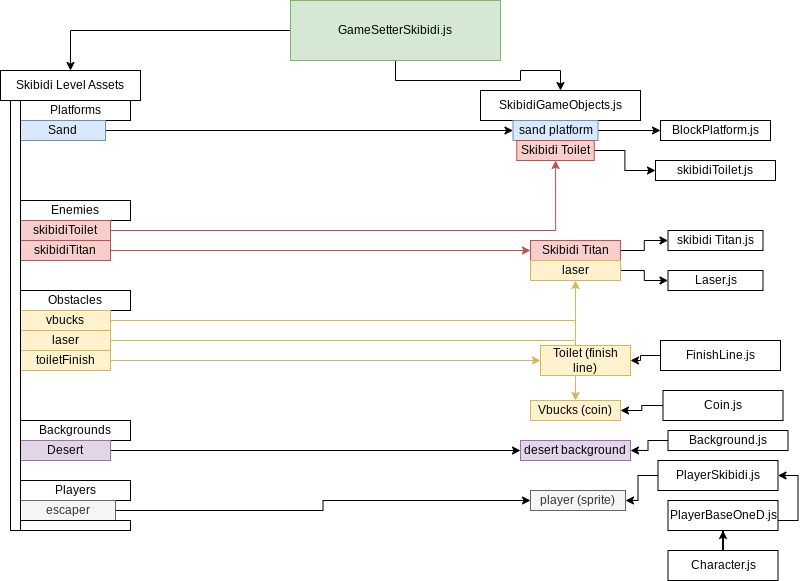
My Favorite Change
Background Dim
- Background dim was the change that caused me to do the most technical exploration of the codebase for platformer3x
- I first had to figure out whether or not I wanted to make a change to all of the background canvases, or if there was a different approach I could use
- My research led me to the conclusion that it would be easiest to creat a new div element that would layer on top of the existing screen when the leaderboard was opened
backgroundDim: {
}
- backgroundDim was created as a property under the leaderboard object
- There are two functions,
create()andremove() - The create function generates the div element and assigns all of its properties
create () {
      this.dim = true // sets the dim to be true when the leaderboard is opened
      console.log("CREATE DIM")
      const dimDiv = document.createElement("div");
      dimDiv.id = "dim";
      dimDiv.style.backgroundColor = "black";
      dimDiv.style.width = "100%";
      dimDiv.style.height = "100%";
      dimDiv.style.position = "absolute";
      dimDiv.style.opacity = "0.8";
      document.body.append(dimDiv);
      dimDiv.style.zIndex = "9998"
      dimDiv.addEventListener("click", Leaderboard.backgroundDim.remove)
},
- The remove function sets the leaderboard property of
isOpento false
remove () {
      this.dim = false
      console.log("REMOVE DIM");
      const dimDiv = document.getElementById("dim");
      dimDiv.remove();
      Leaderboard.isOpen = false
      leaderboardDropDown.style.width = this.isOpen?"70%":"0px";
      leaderboardDropDown.style.top = this.isOpen?"15%":"0px";
      leaderboardDropDown.style.left = this.isOpen?"15%":"0px";
},
- When working in
SettingsControl.jsI applied similar logic, but the file is not constructed the same as the leaderboard so I had to create background dim as its own object as opposed to a method
Working in a Team for Game Development
- This trimester was a bit more complex since my team was double the size of the group from tri 1
- We realized how much more important communication would be when our progress was held up by various merge issues relating to a lack of team communication and not being in sync with the class version control
- We also did a lot more for documentation this trimester than in tri 1, as one of my primary responsibilities within the team was to ensure that we kept up to date with our issues and our pull requests - This proved useful in our team live reviews since explaining our changes was a lot easier when we used issues, demos, and pull requests
- All in all, I learned a lot about working with a team this trimester and furthered my technical understanding of game development in javascript, so I feel ready to take the next step into college where I can use everything I have learned in CSSE